Not every plant care app does the same job. The best one is not the app with the most features bolted on. It is the one that catches trouble before your plant actually suffers, rather than logging a watering reminder and hoping for the best.

A spider plant turning yellow might need repotting or more light, and an app that only says “water now” will not help with that.
A genuinely useful app spots issues early, even in common houseplants like the golden snake plant, and tells you what to do about it. This guide compares the leading plant care apps side by side, including LetPlant’s own tools, to see which one fits different plant parents best.

Most houseplant apps handle basic reminders or plant identification, but few do everything. LetPlant’s ecosystem (photo ID, AI diagnosis, and the voice-enabled SDESA monitor) aims to catch problems early, though competitors have real strengths too: bigger plant databases, more active communities, simpler interfaces, or lower cost.
Below are the top apps of 2026, with what each does well and where it falls short.
How we chose these apps
Every app on this list was checked against how it actually performs on common houseplants, snake plants included, based on real features and current reviews rather than spec sheets alone.
Each one has to solve a specific care problem, identification, diagnosis, reminders, or community help, and only apps updated in 2025 or 2026 with active support, a real user base, or a genuinely unique feature made the cut.
Preference went to apps available on major phones, iOS and Android, or on the web, rather than ones locked to a single device, and pricing had to be transparent: whether an app is free, freemium, or subscription-based, and whether a free tier or trial exists.
Your houseplant is dying right now — and you have no idea why.
Stop killing your houseplants.
The fix takes 60 seconds.
Snap a photo. LetPlant AI instantly diagnoses what’s wrong, tells you exactly when to water, and alerts you before it’s too late — not after.
FREE Save my houseplants nowNo credit card. No catch. Just healthier houseplants.
Every entry below also names a real drawback, whether that’s cost, platform limits, or thin features, rather than pretending there isn’t one.
1. LetPlant, best for all-in-one AI care with voice monitoring

LetPlant combines a free web and mobile ID tool with a smartphone app that does it all: snap a photo of any plant and get the species name, a care guide, a disease diagnosis, and a pet toxicity report.
Its standout feature is the SDESA voice device, which continuously monitors soil moisture, light, temperature, and air quality, then speaks up with alerts like “time to water” before trouble starts.
That means LetPlant can warn you before a wilted leaf appears, not after the fact. It can diagnose a limp Zamia or a drooping Gasteria and tell you what to fix.
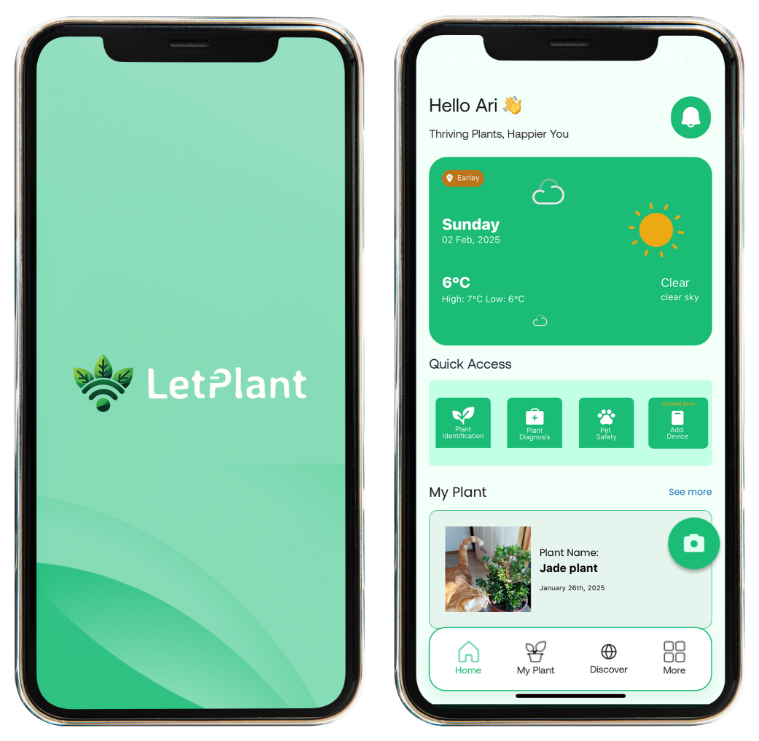
The core tool is entirely free, no account needed on the plant.id site, and claims 98 percent accuracy across more than 500,000 species.
Limitations: some features, like the AskDaisy voice assistant, are still rolling out through 2026, and LetPlant’s broader ecosystem is not the cheapest subscription overall, even though the ID and diagnosis tools stay free.
It is the only true all-in-one system here, identification, diagnosis, and proactive voice alerts in one place, though PictureThis and PlantIn may edge it on ID speed, and Vera wins on being entirely free.
Plant identification and care apps work best when they spot trouble early instead of just reminding you to water. A good app will catch an issue in a spider plant or a golden snake plant before you do.
2. Planta, best for a polished interface and care schedules
Planta is a beginner-friendly app with more than 7 million users that makes care planning easy. It builds individual watering and fertilizing schedules for each plant based on species and location.
It also has “Dr. Planta,” an AI assistant that diagnoses sick plants from a photo, similar to LetPlant and PictureThis, plus a light meter so you can check a spot’s brightness.
Planta gives clear, step-by-step care plans with water and fertilize schedules and light recommendations, and it has a large database of common houseplants. Limitations: most advanced features require Planta Premium, a subscription that runs about $36 to $48 a year after a 7-day trial.
And like other scheduler apps, it can only guess a plant’s needs from species and climate. It won’t know your Mass Cane is waterlogged or your snake plant is bone dry. For beginners who want an organized app with rich plant information and reminders, Planta still holds up well.

3. PictureThis, best for instant plant identification and a plant encyclopedia
PictureThis is the app to reach for if you want fast, accurate identification and a deep reference library. Point your camera at a plant and it names it, claiming 98 percent accuracy across 400,000 species, then shows you care tips right away.
It also diagnoses diseases: snap a photo of a sick leaf and it suggests treatments, brown spots included. Its database of plants and problems is large, and it has extras like toxicity checks and a light meter.
Limitation: nearly everything sits behind a paywall.
After a 7-day trial it costs roughly $40 a year, or $4 to $8 a month, for unlimited use. PictureThis was built for identification first, so its care reminders and social features are thin. If you only need identification and disease help plus a big library, it is hard to beat. If you want scheduling, journaling, or a real free plan, look elsewhere on this list.
4. Blossom, best for beginner guidance and disease identification
Blossom is a care guide app aimed at new plant parents. It has care tips for common houseplants (watering, light, fertilizing) in a simple interface, plus basic identification for more than 30,000 species and a photo disease-diagnosis tool.
You can set reminders for watering or repotting, and there is a built-in water calculator and a shopping list for plant supplies. It is easy to use and includes a botanist chatbot for questions.
Limitation: the free tier is limited to only a few daily IDs, and features like unlimited IDs and expert answers need Blossom Premium, which runs about $5.99 a month or $69.99 a year.
It is not as feature-rich as Planta or Greg, but it is easy to pick up. Blossom works like a friendly digital plant handbook, solid for casual beginners, though power users will need to pay to unlock more.

5. Vera, by Bloomscape, best for free reminders and logging
Vera is a basic, completely free plant care app now maintained by Bloomscape. It focuses on scheduling and tracking rather than AI.
You build a profile for each plant with photos, name, and species, then set up care schedules for watering, fertilizing, repotting, and pruning. The app reminds you when each task is due.
You can log every watering or fertilizing event in a timeline and read general tips from Bloomscape’s team.
Limitations: Vera has no plant identification or diagnosis, so you need to already know the species, and it does not predict problems beyond its set schedule. It is fully free and fairly polished, with no hidden costs.
For a diary and reminder system covering 10 to 20 plants, especially if you have a Mass Cane or another thirsty dracaena, Vera is a straightforward, no-frills option.
6. PlantIn, best for all-in-one care with “Ask the Botanist”
PlantIn packs in a wide range of features and has grown fast, with more than 40 million installs and 227,000 App Store ratings. It works like PictureThis and Blossom combined: plant identification, disease diagnosis, and care scheduling in one app.
Its “Ask the Botanist” chat connects you with human experts for care questions, and it even has a mushroom identification tool for foragers. It also includes water and light meters and logs your plant collection with photos and journal entries. PlantIn is feature-rich and used worldwide.
Limitation: the interface can feel overwhelming, and pricing is steep. After the short free trial, the standard rate is about $7 a week, close to $28 a month, unless you catch a lifetime offer.
You get a lot of tools here, but at a real cost for heavy use. PlantIn works well as a one-stop app if the subscription does not bother you and you actually plan to use the AI advice.
7. Greg, best for personalized reminders and community
Greg, formerly branded “Greg, Plant Identifier and Care,” blends plant identification with strong scheduling. You can identify plants by photo for free, then build customized care plans for watering, fertilizing, and misting based on each plant’s needs.
A real perk is Greg’s community forum, where you can ask questions and get suggestions from other plant owners. Its standout feature is climate-based watering: it pulls your local weather and your plant’s pot and soil information to adjust schedules to actual conditions.
Limitations: community answers are not instant, and features like detailed guides or unlimited reminders need a Pro plan, about $30 a year after a free trial.
If you want reminders grounded in real weather data plus a helpful forum, Greg delivers. It is especially useful if overwatering is your problem. It might tell you to skip a watering because it rained or humidity is already high.

8. Gardenize, best for garden journaling and a large plant database
Gardenize is less an AI care tool and more a digital garden diary with a community attached. It has a plant database of 45,000 species and lets you catalog every plant in your home or yard.
You can take and annotate photos over time, set reminders for watering, fertilizing, and harvesting, and record notes or to-dos.
There is even a “garden social” feed for tips from other users. Its real strength is organization: you can group plants by area, set custom events, and export your data to spreadsheets.
Limitations: the free version covers only basic features, and a paid Gardenize Plus subscription unlocks advanced reminders and exports. It also does not auto-identify plants, so you search the database yourself.
For a sprawling indoor-and-outdoor collection, or detailed tracking for something like a golden snake plant or outdoor vegetables, Gardenize is a strong choice. It is not built for a quick “what’s wrong with this leaf” check. It suits methodical gardeners who like to log everything.
9. Plantify, best for AI identification and care on a budget
Plantify is a newer all-in-one plant app with more than 5 million Android installs and 72,000 reviews, built around comprehensive ID and care guidance. It uses AI to identify plants, flowers, trees, succulents, and even mushrooms from photos.
Once a plant is identified, Plantify gives care tips on watering, lighting, and fertilizing for indoor or outdoor plants, plus curated guides for categories like orchids and succulents, and it updates its database regularly.
Limitations: like PictureThis and PlantIn, many features sit behind a Pro subscription, though promotions are common. It is still catching up in some areas, there is no light meter, for instance, and ads can get in the way.
Plantify suits people who want decent free ID and basic tips without a steep price tag. Think of it as a lighter alternative to PictureThis: strong on AI identification and static care content, but not as polished or feature-packed as the bigger names.
10. Plant Parent, best for traditional care reminders
Plant Parent, made by the team behind PictureThis, sits close to Planta and Greg in what it does. It focuses on classic care routines: add your plants and get reminders for watering, fertilizing, and pruning.
It also has a light meter, photo identification, and a disease-detection tool for when a plant looks unhealthy. For more advanced gardeners, it can generate personalized care plans, including watering schedules, fertilizer guidance, and pruning tips, for almost any species.
Limitations: core features like reminders and basic tips are free, but unlimited IDs and one-on-one expert chat need Plant Parent Premium, around $30 a year. It overlaps heavily with Planta and Greg and does not carve out much of its own identity.
Even so, it has 89,000 App Store ratings at 4.7 stars, so it clearly has a loyal following. It is a solid all-rounder for a single app that does ID, reminders, and health checks, though nothing here truly sets it apart from the rest of this list.

Comparison table: here is a quick summary of the key facts and standout points for each app, for comparing at a glance.
| App (best for) | Platforms | Price | Standout feature |
| LetPlant (all-in-one) | iOS, Android, web | Free (plant.id tool) | AI plant ID, health diagnosis, and voice-enabled SDESA |
| Planta (schedules) | iOS, Android | ~$36-48/year after trial | Polished interface, detailed care schedules and guides |
| PictureThis (ID) | iOS, Android | $39.99/year (after 7-day trial) | 98% accurate photo ID plus automatic disease diagnosis |
| Blossom (ease) | iOS | $5.99/mo or $69.99/yr (limited free use) | Beginner-friendly guides, disease ID, and AI botanist chat |
| Vera (reminders) | iOS, Android | Free (no paid tier) | Simple, unlimited care schedules and logs, free |
| PlantIn (all-in-one) | iOS, Android | $29.99/year (premium), $6.99/week and up | Comprehensive toolkit plus “Ask the Botanist” chat |
| Greg (climate) | iOS, Android | $29.99/year after trial | Climate-based watering plans and community support |
| Gardenize (journal) | iOS, Android, web | Free basic, ~$6.99/mo+ (Plus plan) | Garden notebook: 45K plant database plus reminders and notes |
| Plantify (ID/care) | iOS, Android | Free with ads, premium upgrades | AI plant ID and care tips at a lower price point |
| Plant Parent (all-in-one) | iOS, Android | $29.99/year (premium) | Smart reminders, plant ID, and light meter |
How to pick the right one for you
- Decide what problem you actually need solved. Are you unsure what species you have? Do you need watering reminders? Do you want help diagnosing sick leaves? Pick an app built for that specialty: PictureThis or Plantify for identification, Vera for simple reminders.
- Check platform and budget. Confirm the app works on your phone, Android or iPhone, and check pricing. Many apps are free for basic use but need a subscription for full features, so start with a free trial before you commit.
- Test it on a few of your actual plants, maybe a spider plant and a snake plant, and see how the app handles them. Does it identify them correctly? Does it give a reasonable care schedule? Does it respond well to drought or pest symptoms?
- Try the reminders. If watering is your weak point, test the app’s scheduler. Some, like Greg, adjust for weather. Others, like Vera, assume indoor averages. Pick one you trust, and still check the soil with your own hand before you water.
- Look at the extra help on offer. If community or human advice matters to you, check which app lets you ask real questions, PlantIn, Greg, and Gardenize all do. And if you pay for a plan, make sure you will actually use those extra features regularly.
What these apps can’t do for you

Most of these apps, aside from sensor-based ones like Letplant, can only guess a plant’s condition from a schedule or an occasional photo.
They cannot feel the soil or read a thermometer for you, and none of them can see hidden issues like root rot or tiny pests in the soil, so you still need to lift the pot, check the roots, or look closely at the leaves yourself now and then.
An app can remind you to water a snake plant, but only you know if it was sunny or shady that day, and a plant sitting near an AC vent or in some other microclimate can throw off its guess entirely.
A notification, or SDESA speaking up, does nothing if you ignore it: these apps can advise, but they cannot water or move a plant themselves, and even the smartest one only works if you follow through.
None of them run plant care on their own either. They will not fertilize, repot, or save a dying plant by themselves. They’re tools that help you do the work, not a replacement for doing it.

Disclosure: this roundup comes from LetPlant, and we have aimed to keep it fair. Each app is described with its real strengths and weaknesses, including where competitors shine, like PictureThis’s huge ID database or Vera’s zero cost. Choose whichever app actually fits your plants and your habits.
FAQ
Are plant care apps really worth it?
They can help a lot, but they are not magic. Most apps are strong at reminders, identification, and general care tips, but they still rely on you to follow through. For routine tasks and quick ID, they save real time, though they cannot replace occasional hands-on checks or actual plant expertise.
How accurate is AI plant identification?
Leading apps, including LetPlant, PictureThis, PlantIn, and Plantify, claim roughly 90 to 98 percent accuracy on common houseplants. That means they are usually right, though rare or similar-looking species are still worth a second look. Many apps will offer a few possible matches rather than just one.
Do I need a subscription?
Most apps give you basic features for free, one-off IDs, limited reminders, but charge for unlimited use. Planta, PictureThis, and Greg each run yearly subscriptions in the $30 to $40 range after a free trial. Vera and LetPlant’s ID tool stay entirely free.
How does LetPlant’s SDESA device work?
SDESA is a small sensor you place in your plant’s pot. It monitors soil moisture, light, temperature, and air quality continuously, then speaks up, saying something like “your fiddle leaf fig needs water now” before wilting starts. That real-time monitoring is what separates SDESA from phone-only apps.
Can I use more than one app?
Yes. Some plant owners use an ID-focused app like PictureThis or Plantify to label new plants, a scheduling app like Planta or Vera for reminders, and LetPlant’s tools for diagnosis. Just watch how many subscriptions you stack up. Usually one or two apps cover everything you need.
Will these apps replace my own plant knowledge?
No. They are teaching tools and reminders, and they work best alongside your own observation and hands-on practice. If an app tells you to add more water but the soil is already soaking wet, trust your hands over the app.
Final verdict
For most plant parents, LetPlant’s ecosystem is the strongest choice going into 2026. Free photo ID and diagnosis paired with the SDESA voice monitor means issues get caught early, often before any symptoms show up on the leaves.
That combination, spotting a dry-soil or low-light problem and saying the fix out loud, works as a real safety net for anyone too busy to check plants daily. That said, other apps lead in specific areas:
PictureThis still has more identification and database depth, Greg has stronger community expertise, and Vera cannot be beaten on cost for a scheduling-only tool. But for one app and device that handles identification, diagnosis, reminders, and monitoring together, LetPlant earns the top spot on this list.
Ready to keep your plants thriving? Download LetPlant, and try plant.id, to see how proactive AI care can help your plants.